Audio connectors play a vital role in audio systems, particularly in professional audio environments. They facilitate the transfer of sound signals between devices, ensuring high-quality audio performance. There are numerous types of audio connectors in professional audio, each tailored for specific applications. Common examples include the XLR connector, TRS cables, and RCA cables. Understanding these professional audio connectors is essential for sound engineers and audio professionals. Additionally, knowledge of balanced vs unbalanced audio connectors is crucial for making informed choices for different setups. A thorough XLR vs TRS vs RCA comparison can further aid in selecting the right connector for your audio needs.
Key Takeaways
- Audio connectors are essential for transferring sound signals between devices, ensuring high-quality audio performance.
- Understanding different types of connectors, like XLR, TRS, and RCA, helps professionals choose the right one for their audio needs.
- Balanced connectors, such as XLR, minimize noise interference, making them ideal for professional audio settings.
- Digital audio connectors like HDMI and USB-C support high-quality sound reproduction and are crucial for modern audio systems.
- Using high-quality connectors enhances sound clarity and reliability, leading to better overall audio performance.
Overview of Audio Connectors
Audio connectors serve as the vital link between various audio devices, enabling seamless communication and signal transfer. They come in different shapes and sizes, each designed for specific functions and applications. Understanding these connectors is essential for anyone involved in audio production or sound engineering.
The most common categories of audio connectors include:
| Connector Type | Description |
|---|---|
| XLR | Backbone of professional audio, used for microphones and lighting |
| 6.35mm | Essential for instruments and studio gear, provides noise-free transmission |
| 3.5mm | Designed for portable audio and consumer electronics integration |
| RCA | Commonly used for connecting audio and video equipment |
| Speakon | Used for high-current applications, ensuring reliability |
| PowerCon | Provides secure connections for power distribution in audio setups |
Each type of connector has unique features that cater to specific audio needs. For instance, XLR connectors minimize interference and ensure secure connections, making them ideal for professional audio settings. Their design allows for balanced audio transmission, which is crucial in environments where sound quality is paramount.
In contrast, 6.35mm connectors are widely used for instruments and studio gear. They provide a robust connection that helps maintain audio integrity. The 3.5mm connector, often found in consumer electronics, offers convenience for portable audio devices.
Understanding the differences in design and function across various audio applications helps professionals select the right connectors for their setups. For example, HDMI connectors support uncompressed LPCM and high-definition surround sound formats, making them suitable for home theaters and gaming consoles. USB-C connectors, on the other hand, support high bandwidth for advanced audio formats, catering to modern devices like smartphones and laptops.
By familiarizing themselves with these audio connectors, professionals can enhance their audio systems and ensure reliable performance across different applications.
Types of Audio Connectors
Professional Microphone Connectors
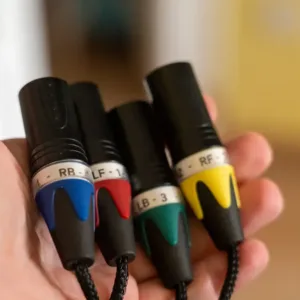
Professional microphone connectors are crucial in both studio and live sound environments. The most widely adopted type is the XLR connector. This connector excels in delivering high-quality audio signals while minimizing interference. In professional recording studios, XLR cables connect microphones to preamps, audio interfaces, and mixing consoles. They ensure that sound engineers capture clear and accurate audio. Similarly, in live sound environments, XLR connectors link microphones to mixers and PA systems, providing reliable audio for performances. Broadcasting also relies heavily on XLR cables to connect microphones to broadcast consoles, ensuring clarity for radio and television.
Tip: When selecting microphone connectors, prioritize those that offer balanced audio transmission. This feature significantly reduces noise and enhances sound quality, especially in professional settings.
Line/Instrument Connectors
Line and instrument connectors play a vital role in audio production. The 3.5mm stereo plug is a standard connector in this category. It reliably transmits high-quality stereo audio, ensuring clear sound. This connector is user-friendly, requiring no charging and allowing for easy insertion and removal. Its design contributes to long-term reliability and stable transmission.
Balanced audio systems, which often utilize connectors like TRS (Tip-Ring-Sleeve), effectively reject noise. This capability is essential in professional audio environments, where maintaining signal integrity is critical. Precision audio connectors, such as XLR connectors, ensure reliable connections that significantly reduce signal loss and interference. The use of high-quality materials, like gold-plated brass, enhances conductivity and resists corrosion, leading to improved sound clarity.
Speaker Connectors
Speaker connectors are essential for transmitting power and audio signals to speakers. Various types are commonly used in professional audio setups, including:
- XLR Connectors: Ideal for balanced audio transmission, providing noise resistance and secure connections for microphones and stage equipment.
- SpeakON Connectors: Designed for high-power audio signals, ensuring safety and reliability with rugged designs that minimize disconnection risks.
- 3.5mm and 6.3mm Connectors: Often used for connecting smaller speakers or monitors, these connectors provide versatility in various audio applications.
Durability is a key consideration when selecting speaker connectors. They must withstand environmental stresses, including temperature extremes and moisture, to maintain reliability in diverse audio applications. Choosing the right connectors directly impacts power handling and overall system performance.
Digital Audio Connectors
Digital audio connectors have transformed the way audio signals transmit between devices. They facilitate high-quality sound reproduction and support various audio formats. Understanding these connectors is essential for audio professionals who work with modern digital systems.
Several types of digital audio connectors exist, each designed for specific applications and formats. The most common types include HDMI, Optical (TOSLINK), Coaxial, and USB-C. Each connector offers unique features that cater to different audio needs.
-
HDMI: This connector supports high-definition audio and video signals. It can transmit multi-channel audio formats such as LPCM, Dolby TrueHD, and DTS-HD Master Audio. HDMI simplifies connections by combining audio and video into a single cable, making it ideal for home theater systems.
-
Optical (TOSLINK): This connector uses fiber optic technology to transmit audio signals. It supports formats like Dolby Digital and DTS, making it suitable for connecting TVs and soundbars. Optical connectors are immune to electrical noise, ensuring clear sound quality.
-
Coaxial: Coaxial connectors utilize RCA-style connectors to transmit stereo PCM audio. They are often used in fixed installations where reliable audio transmission is necessary. Coaxial connectors provide a robust connection, making them a popular choice for many audio setups.
-
USB-C: This connector has gained popularity in recent years, especially for mobile devices and laptops. USB-C supports digital output to digital-to-analog converters (DACs) and headphones. Its versatility and ability to handle high bandwidth make it a preferred choice for modern audio applications.
The following table summarizes the compatibility of these digital audio connectors with various audio formats:
| Connector Type | Supported Formats | Key Features |
|---|---|---|
| HDMI | LPCM, Dolby TrueHD, DTS-HD Master Audio | Supports video and multi-channel audio in one cable |
| Optical (TOSLINK) | Dolby Digital, DTS, stereo PCM | Immune to electrical noise, ideal for TVs and soundbars |
| Coaxial | Stereo PCM | RCA-style connectors, suitable for fixed installations |
| USB-C | Digital output to DACs and headphones | Increasingly popular in mobile and desktop audio |
Choosing the right digital audio connector can significantly impact audio quality and system performance. Professionals must consider the specific requirements of their audio setups when selecting connectors. By understanding the capabilities of each type, they can ensure optimal sound reproduction and compatibility with various devices.
Signal Standards in Audio Connectors
Audio connectors operate under specific signal standards that dictate how sound signals are transmitted. Understanding these standards is essential for audio professionals to ensure optimal performance in various applications.
Analog Signal Standards
Analog signal standards have been the foundation of audio transmission for decades. These standards utilize continuous signals to represent sound waves. Common analog connectors include XLR, TRS, and RCA. Each connector type serves distinct purposes in audio systems.
- XLR Connectors: Widely used in professional audio, XLR connectors provide balanced audio transmission. This design minimizes noise interference, making them ideal for microphones and other sensitive equipment.
- TRS Connectors: The Tip-Ring-Sleeve (TRS) connectors also support balanced audio. They are commonly used for instruments and line-level signals, ensuring high-quality sound reproduction.
- RCA Connectors: RCA connectors transmit unbalanced audio signals. They are prevalent in consumer electronics, such as televisions and home audio systems.
Digital Signal Standards
Digital signal standards have revolutionized audio transmission, enabling higher fidelity and more efficient data transfer. These standards convert sound waves into binary data, allowing for precise audio reproduction. The following table outlines some of the main digital signal standards used with audio connectors in modern audio systems:
| Standard | Advantages | Limitations | Best For |
|---|---|---|---|
| HDMI | Carries audio and video in one cable, supports high-resolution audio. | Cable length can affect quality, potential compatibility issues. | Home theaters, AV receivers, gaming consoles. |
| Optical Audio (TOSLINK) | Immune to electrical noise, supports compressed surround sound. | Limited to 5.1 surround sound, fragile cables. | Connecting soundbars and older receivers. |
| USB Audio Connectors | Supports high-resolution audio, bidirectional data transfer. | Requires driver support, potential for jitter. | Studio recording, high-res audio players. |
| DisplayPort | Supports high-bandwidth audio and video, multiple audio streams. | Less common on consumer equipment, limited adoption in home theaters. | Professional workstations, high-end monitors. |
| Coaxial Digital Audio | Offers better signal integrity over longer distances. | N/A | N/A |
Digital signal standards significantly impact audio quality and system interoperability. For instance, higher sampling rates improve temporal resolution and reduce latency, which are essential for audio fidelity. Additionally, all devices in a digital audio system synchronize to a common master clock, crucial for maintaining audio quality and preventing timing errors.
Balanced vs. Unbalanced Signals
The distinction between balanced and unbalanced signals plays a critical role in audio quality. Balanced signals utilize a separate shield that enhances noise rejection compared to unbalanced signals. In unbalanced systems, the shield also serves as the signal return wire, making them more susceptible to interference.
-
Balanced Signals:
- Balanced audio cables effectively reject common-mode noise due to their design, which includes differential amplifiers or transformers.
- The ground connection in balanced systems is solely for shielding, allowing for better signal integrity.
- Balanced audio is preferred in professional settings like recording studios and live sound setups due to its ability to minimize noise and interference.
-
Unbalanced Signals:
- Unbalanced connectors, such as RCA cables and TS cables, are common for consumer electronics and instruments.
- They are more prone to noise interference, especially over long cable runs.
Choosing the right type of signal transmission is vital for achieving the best audio quality in any setup.
Professional Applications of Audio Connectors

Live Sound Reinforcement
In live sound reinforcement, audio connectors play a crucial role in ensuring clear and reliable sound transmission. Professionals often use XLR connectors to link microphones to mixing consoles. These connectors provide balanced audio, minimizing noise interference during performances. Additionally, SpeakON connectors are preferred for connecting speakers to amplifiers. Their robust design ensures secure connections, even in dynamic environments.
Tip: Always check connections before a performance to avoid interruptions. A loose connector can lead to sound dropouts, affecting the overall experience.
Studio Recording
In studio recording, audio connectors significantly influence signal routing and quality. The process begins with the sound source, such as a voice or instrument. The microphone or instrument cable captures the sound and converts it into an electrical signal. This signal travels through various components, including the audio interface, which boosts the signal and converts it from analog to digital. The following list outlines the essential components involved in this process:
- The Source – Your voice, guitar, keyboard, or any sound you’re recording.
- The Microphone or Instrument Cable – Captures the sound and turns it into an electrical signal.
- The Audio Interface (Preamp + Converter) – Boosts the signal to a usable level and changes it from analog to digital.
- The Computer & DAW (Digital Audio Workstation) – Records, processes, and mixes the signal.
- Plugins & Effects – EQ, compression, reverb, delay—whatever tools you add inside your DAW.
- The Output (Monitors/Headphones) – Converts the signal back into sound waves you can hear.
For high-fidelity studio recording, professionals often prefer specific audio connectors. The table below summarizes the most commonly used types:
| Connector Type | Common Uses | Description |
|---|---|---|
| TRS | Balanced audio equipment, studio monitors | TRS cables are balanced and reduce noise during transmission. |
| XLR | Microphone connections, studio monitors | XLR cables are essential for connecting microphones to preamps and mixers. |
| RCA | Consumer audio equipment | RCA connectors are often used for unbalanced audio signals. |
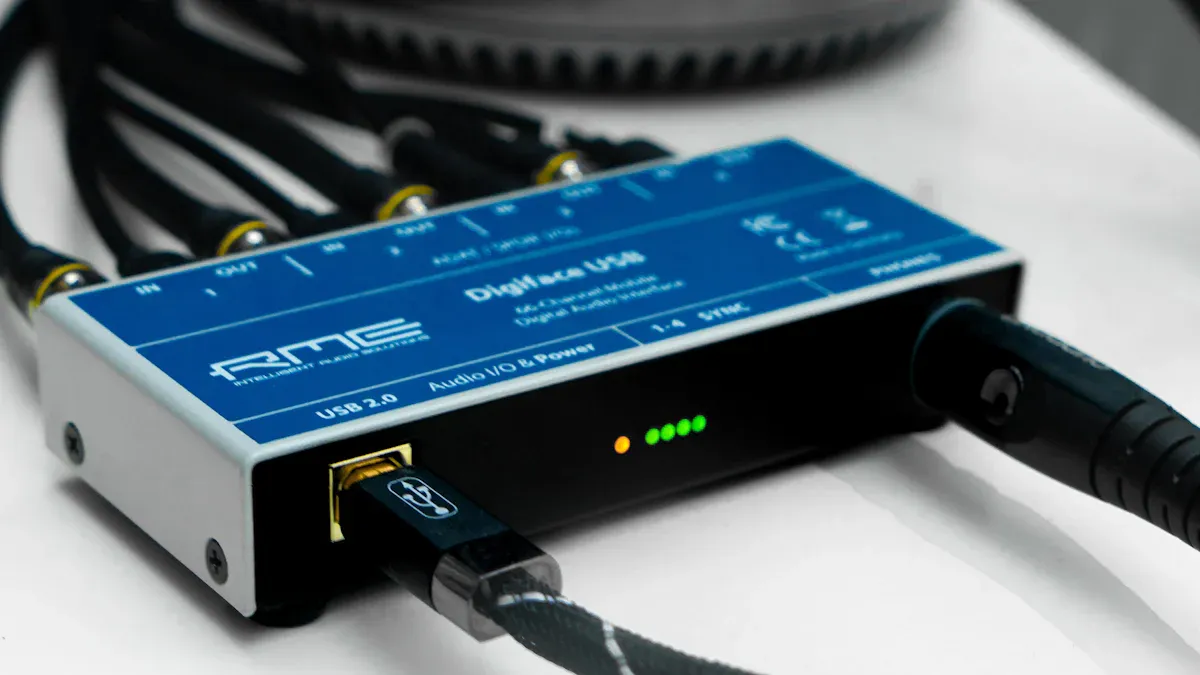
| USB | Digital audio interfaces | USB connectors are used for digital audio transmission. |
| ADAT | Adding preamps and extra audio channels | ADAT cables are industry-standard for expanding audio interfaces. |
| S/PDIF | Digital audio transmission | S/PDIF connectors carry two channels of audio and work independently of sample rate. |
Broadcast and Streaming
In broadcast and streaming applications, audio connectors ensure high-quality sound transmission. XLR connectors remain the industry standard for connecting microphones to broadcasting equipment. Their balanced design minimizes noise, which is essential for clear audio in radio and television. Additionally, USB connectors facilitate direct connections between microphones and computers, streamlining the recording process for podcasters and streamers.
Note: Always use high-quality cables to maintain audio integrity. Poor-quality connectors can introduce unwanted noise and degrade sound quality.
Home Audio Systems
Home audio systems rely heavily on various audio connectors to deliver high-quality sound. These connectors facilitate the connection between different devices, ensuring seamless audio playback. Commonly used audio connectors in home audio setups include:
- RCA Cables: These cables connect devices like VCRs, DVD players, and stereo receivers. They transmit analog audio signals and are widely recognized for their ease of use.
- HDMI Cables: HDMI cables transmit both audio and video signals. They support high-quality audio formats, making them ideal for modern home theater systems.
- USB Cables: USB connectors have become increasingly popular for digital audio. They often replace the traditional 3.5mm headphone jack in newer devices, providing a reliable connection for high-resolution audio.
- S/PDIF Cables: These cables transmit digital audio signals and come in optical and coaxial formats. They are essential for connecting devices like soundbars and AV receivers.
The choice of audio connectors significantly impacts sound quality in consumer home audio setups. High-quality connectors reduce signal loss and interference, leading to clearer sound reproduction. Precision audio connectors enhance sound clarity and ensure reliable performance. For instance, USB-C cables with high bandwidth support advanced audio formats, capturing more detail than standard CD-quality audio. This results in a richer listening experience.
Technological advancements in audio equipment necessitate sophisticated connectors. The demand for advanced audio connectors is driven by innovations in surround sound systems and wireless audio devices. As consumers seek improved audio experiences, understanding the role of these connectors becomes essential for optimizing home audio systems.
Tip: When setting up a home audio system, always opt for high-quality connectors. They can make a significant difference in sound clarity and overall performance.
Understanding the various types of audio connectors and their signal standards is vital for effective audio management in professional settings. Knowledge of different connector types, such as 3.5mm TRRS, RCA, and SpeakON, ensures compatibility and optimal audio signal quality. Each connector serves specific applications, highlighting the need for expertise in different contexts.
Proper use of connectors enhances sound quality and ensures reliable audio transmission. Higher-quality connectors, made from materials like gold or silver, provide secure signal transfer and minimize interference. This attention to detail empowers professionals to make informed decisions in their audio setups, ultimately leading to improved performance and longevity of their equipment.
FAQ
What is the purpose of audio connectors?
Audio connectors facilitate the transfer of audio signals between devices. They ensure high-quality sound reproduction and maintain signal integrity in various audio applications, from live performances to studio recordings.
How do I choose the right audio connector?
Selecting the right audio connector depends on the specific application and equipment compatibility. Consider factors such as signal type (analog or digital), cable length, and the environment where the connector will be used.
What is the difference between balanced and unbalanced connectors?
Balanced connectors use two signal wires and a ground, reducing noise interference. Unbalanced connectors have one signal wire and a ground, making them more susceptible to noise, especially over long distances.
Can I use different types of connectors together?
Yes, but using adapters may be necessary. Ensure that the connectors are compatible with the devices involved. Always prioritize maintaining signal quality when mixing different connector types.
Why are XLR connectors preferred in professional audio?
XLR connectors are favored for their balanced audio transmission, which minimizes noise and interference. Their secure locking mechanism also ensures reliable connections in dynamic environments, making them ideal for microphones and live sound setups.